

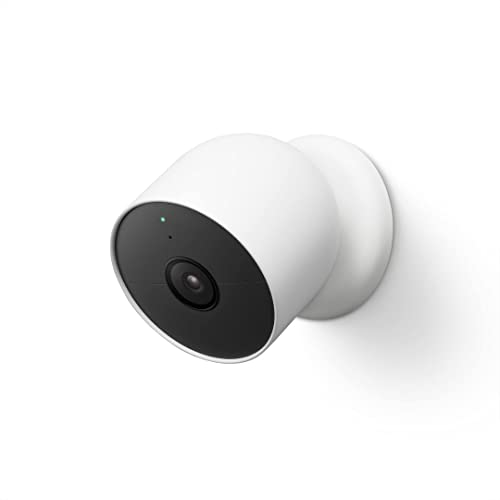
Who this is for: Best for Google Home users who want a flexible indoor/outdoor security camera with smart alerts and easy placement.
Google Nest Cam (Battery) Review (2026): Specs, Pros & Cons, and Who It's For
Key Specifications
| Spec | Details |
|---|---|
| Product | Google Nest Cam Outdoor or Indoor, Battery - Wireless Security Camera | Home security camera, built-in intelligent alerts, 1080p HDR video, works with Google Home and Alexa |
| Video | 1080p HDR with night vision |
| Power | Battery powered; optional power accessories sold separately |
| Smart Detection | Person, animal, and vehicle alerts |
| Free Recording | 3 hours of event video history |
| Extended History | Up to 60 days with Nest Aware subscription |
| Connectivity | Bluetooth and Wi-Fi |
| Temperature Range | –4°F to 104°F (–20°C to 40°C) |
| Installation | Magnetic mount; indoor or outdoor placement |
| Backup Recording | Stores up to an hour of recorded events during Wi-Fi or power outages |
Design & Build Quality

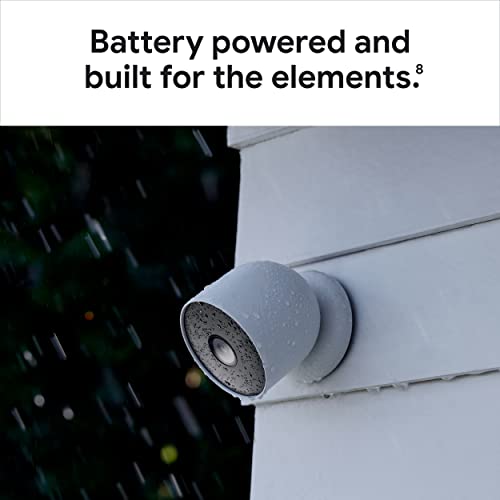
The Google Nest Cam (Battery) is designed for one of the biggest pain points in home security: placement flexibility. Because it runs on battery power, you are not tied to an outlet, which makes it easier to mount in spots that are hard to wire, like a front porch, side yard, garage entry, or a nursery shelf. That flexibility is one of the main reasons this model stands out in research-based comparisons.
The magnetic mount is another practical win. Manufacturer specs emphasize easier installation, and verified owner feedback commonly points to the camera’s straightforward mounting process as a major convenience. The outdoor-ready design and stated operating temperature range also make it more versatile than many indoor-only pet or security cameras.
Build-wise, the Nest Cam feels purpose-built rather than flashy. It is not trying to be a moving robot or a treat dispenser; instead, it focuses on being a clean, discreet camera that blends into a home. That simplicity is good news for buyers who want a reliable camera without a complicated setup.
✓ Pros
- Battery-powered design allows flexible placement indoors or outdoors
- Magnetic mount makes installation simpler than many wired cameras
- Works in a wide temperature range for year-round use
- Compact, low-profile design blends into home exteriors and interiors
✗ Cons
- Battery operation may require more maintenance than wired cameras
- Some advanced features depend on the Google ecosystem
- Continuous recording requires extra accessories and a subscription
Performance & Features

Performance is where the Nest Cam earns most of its reputation. The headline feature is intelligent detection: it can distinguish between a person, animal, and vehicle and send alerts through the Google Home app. For buyers who are tired of generic motion pings, that kind of filtering is a major quality-of-life improvement. It helps reduce false alerts and makes the camera more useful for driveways, porches, and pet monitoring.
Video quality is another strength. The camera records in 1080p HDR and includes night vision, which gives it a solid baseline for day-to-night coverage. While it is not the highest-resolution camera in the broader market, published reviews generally praise the Nest Cam for delivering clear, usable footage that is easy to review in the Google Home app.
The free 3 hours of event video history is especially noteworthy because it gives the camera immediate usefulness without forcing a subscription on day one. That said, Google clearly positions Nest Aware as the path to deeper history, with up to 60 days of video history and, with supported accessories, continuous recording. For buyers who want a set-it-and-forget-it security system, those extras may matter a lot.
One underrated feature is offline protection. If Wi-Fi goes down or there is a power outage, the camera can store up to an hour of recorded events. That does not replace a full NVR or always-on wired system, but it does add a layer of resilience that many competing battery cameras lack.
Integration is another major selling point. The camera works with Google Home and Alexa, but it is most naturally at home in Google’s ecosystem. If you already use Google Assistant, Nest speakers, or other Google Home devices, the experience is more cohesive. If you are not in that ecosystem, the camera still works, but some of the appeal is reduced.
✓ Pros
- Person, animal, and vehicle detection helps reduce irrelevant alerts
- 1080p HDR video with night vision provides dependable day and night coverage
- 3 hours of free event history adds value without an immediate subscription
- Stores up to an hour of events during outages or Wi-Fi interruptions
- Works with Google Home and Alexa
✗ Cons
- Best features are strongest inside the Google ecosystem
- Longer video history requires a paid subscription
- Continuous recording needs separate accessories and service
Value for Money
In a research-based value comparison, the Nest Cam sits in the premium tier for a reason: it is not the cheapest way to add a camera to your home, but it does offer a polished experience with strong software support, flexible placement, and useful smart alerts. The value proposition is strongest for people who want a reliable, low-fuss camera and are already comfortable with Google services.
If you only need basic live video, cheaper indoor cameras can cover the essentials. But the Nest Cam’s combination of battery power, outdoor readiness, intelligent alerts, and backup event storage gives it a more premium feature set than many budget competitors. That makes it a smarter buy for homeowners or renters who want one camera that can move between indoor and outdoor duties.
The main value caveat is subscription dependence. The camera is useful without Nest Aware, but buyers who expect deep history or continuous recording should factor in the extra cost of accessories and service. In other words, the upfront hardware is only part of the story.
✓ Pros
- Strong feature set for a premium battery camera
- Free event history gives immediate utility
- Flexible enough for indoor or outdoor use
- Good fit for existing Google Home users
✗ Cons
- Premium positioning may be too expensive for basic needs
- Best long-term value depends on optional paid features
- Battery cameras require occasional recharging
Who Should Buy This
This camera is best for buyers who want a flexible security option without running cables. It is a strong fit for apartment dwellers, homeowners, and anyone who wants one camera that can monitor a front door, patio, garage, or indoor space.
It is also a particularly good match for people already invested in Google Home. If you like controlling devices through the Google Home app and want smart alerts that are more specific than generic motion detection, the Nest Cam makes a lot of sense.
Pet owners may also appreciate the animal detection feature, though this is still primarily a security camera rather than a pet-focused interactive system. If your goal is to monitor a dog or cat while you are away, it works well as a watchful camera, not as a two-way engagement device with treat tossing or auto-tracking.
Who Should Look Elsewhere
Look elsewhere if you want the cheapest possible camera for a simple room monitor. The Nest Cam’s premium positioning means some buyers will pay for features they do not need.
You should also consider another model if you want continuous recording right out of the box, or if you prefer a camera that is more centered on pet interaction than security. Some alternatives in this roundup offer auto-tracking, treat dispensing, or mobile coverage that the Nest Cam does not attempt.
Finally, if you do not use Google Home and do not want to manage another app ecosystem, a more platform-agnostic option may be a better fit.
Best Alternatives
PETLIBRO Dog Camera with Phone App, 360° Auto Tracking Pet Camera Indoor with Phone App for Home Alone Pets, Cat & Puppy Camera with 2-Way Audio, Night Vision, Indoor Camera WiFi

PETLIBRO Dog Camera with Phone App, 360° Auto Tracking Pet Camera Indoor with Phone App for Home Alone Pets, Cat & Puppy Camera with 2-Way Audio, Night Vision, Indoor Camera WiFi is the better pick if your main goal is staying connected to pets indoors. Its auto-tracking, 2-way audio, and AI pet-recognition features make it more interactive than the Nest Cam.
✓ Pros
- 360° auto tracking follows pets around the room
- Two-way audio and pet-focused alerts
- AI recaps and pet recognition for multiple animals
✗ Cons
- Indoor-only design
- Less suited to general home security
2026 3K Pet Camera Treat Dispenser, 32ft Remote Tossing for Dogs & Cats – Reduces Separation Anxiety, 360° View, Security Indoor Cam w/ Phone App, Barking Alerts, No Subscription, 5G WiFi, Robot M3

2026 3K Pet Camera Treat Dispenser, 32ft Remote Tossing for Dogs & Cats – Reduces Separation Anxiety, 360° View, Security Indoor Cam w/ Phone App, Barking Alerts, No Subscription, 5G WiFi, Robot M3 is ideal if you want a pet camera that actively comforts and rewards your dog or cat. The treat-tossing feature and barking alerts make it more hands-on than the Nest Cam.
✓ Pros
- Treat tossing for remote interaction
- 3K video and 360° coverage
- No mandatory subscription
✗ Cons
- Indoor-focused design
- More specialized than a general security camera
Enabot EBO ROLA PetPal Mobile 2.5K Pet Camera Robot with Treat Dispenser | Whole-Home Mobility, Two-Way Talk, Night Vision, Auto-Recharge, Interchangeable Modular Design

Enabot EBO ROLA PetPal Mobile 2.5K Pet Camera Robot with Treat Dispenser | Whole-Home Mobility, Two-Way Talk, Night Vision, Auto-Recharge, Interchangeable Modular Design makes more sense if you want a camera that can move around the house. Its mobile design gives it a major advantage for checking different rooms and corners.
✓ Pros
- Whole-home mobility
- Two-way talk and treat dispenser
- Auto-recharge adds convenience
✗ Cons
- More complex than a fixed camera
- Primarily for indoor pet monitoring
Final Verdict
The Google Nest Cam (Battery) is an easy recommendation for buyers who want a flexible, premium security camera with smart alerts and a clean setup. It is especially compelling if you already use Google Home and want a camera that can work indoors or outdoors without wiring hassles.
If you want a general-purpose camera with strong detection, reliable video quality, and useful free event history, this is a solid buy. If you want the absolute lowest-cost option or a more pet-interactive device, one of the alternatives above may fit better.
Recommendation: Buy it if you value placement flexibility, smart alerts, and a polished Google-based experience.
Frequently Asked Questions
Is the Google Nest Cam (Battery) good for outdoor use?
Yes. It is designed for both indoor and outdoor use, and its battery-powered design makes it easier to place in locations where wiring would be difficult.
Does the Google Nest Cam (Battery) need a subscription?
No, not for basic use. It includes 3 hours of free event video history, but longer history and some advanced features require a Nest Aware subscription.
Can the Google Nest Cam (Battery) tell the difference between people and pets?
Yes. Manufacturer specs state that it can distinguish between people, animals, and vehicles and send more specific alerts.
Does the Google Nest Cam (Battery) work during Wi-Fi outages?
It can store up to an hour of recorded events if Wi-Fi goes down or there is a power outage, which helps you avoid losing every clip.
Who is the Google Nest Cam (Battery) best for?
It is best for buyers who want a flexible security camera for indoor or outdoor use, especially if they already use Google Home and want smarter motion alerts.
Pros
- Battery-powered indoor/outdoor flexibility
- Person, animal, and vehicle alerts
- 1080p HDR with night vision
- 3 hours of free event history
- Works with Google Home and Alexa
Cons
- Best features are strongest in Google’s ecosystem
- Longer history requires a subscription
- Continuous recording needs extra accessories
Frequently asked questions
Is the Google Nest Cam (Battery) good for outdoor use?
Yes. It is designed for both indoor and outdoor use, and its battery-powered design makes it easier to place in locations where wiring would be difficult.
Does the Google Nest Cam (Battery) need a subscription?
No, not for basic use. It includes 3 hours of free event video history, but longer history and some advanced features require a Nest Aware subscription.
Can the Google Nest Cam (Battery) tell the difference between people and pets?
Yes. Manufacturer specs state that it can distinguish between people, animals, and vehicles and send more specific alerts.
Does the Google Nest Cam (Battery) work during Wi-Fi outages?
It can store up to an hour of recorded events if Wi-Fi goes down or there is a power outage, which helps you avoid losing every clip.
Who is the Google Nest Cam (Battery) best for?
It is best for buyers who want a flexible security camera for indoor or outdoor use, especially if they already use Google Home and want smarter motion alerts.
Score breakdown
- value
- 8.0
- usability
- 8.8
- durability
- 8.2
- performance
- 8.6
- buyerFeedback
- 8.3

How Scout Picks
Specs & standards
We start from manufacturer specs and category standards.
Expert tests
We weigh independent expert and lab test results.
Verified owner reviews
We read patterns across thousands of real owners.
Scout is our illustrated guide — we research from specs, independent expert tests, and thousands of verified owner reviews. We don't lab-test products ourselves.
How we pick →Get the Full Pet Gear Buyer's Guide
Join our free newsletter — we'll send our latest Pet Gear picks, specs and verdicts straight to your inbox.
Free. No spam. Unsubscribe anytime.
Was this review helpful?
Be the first to share your feedback on this review.
Sign in to vote and let us know what you think.
Discussion (0)
No comments yet. Be the first to start the discussion.
Related Reviews

How to Choose the Best Smart Pet Door for Patios and Decks in 2026: Complete Buying Guide
If you’re trying to figure out how to choose a smart pet door for patios and decks , the biggest challenge is separating genuinely secure, pet-specific systems from basic automatic flaps that can let in drafts, strays, or false triggers. The right model should match your patio/deck opening, your pet

PetSafe Smart Feed Automatic Pet Feeder Review (2026): Specs, Pros & Cons, and Who It's For
The PetSafe Smart Feed Automatic Pet Feeder is built around a practical idea: make scheduled feeding easier without requiring constant attention. Based on the manufacturer’s specs and owner feedback, the overall design focuses on convenience rather than flashy extras, with a large 6L hopper, app-bas

8 Best Pet Cameras with Built-in Treat Dispensers in 2026 — Best for Remote Comfort, Training, and Peace of Mind
If you want to check in on your pet, soothe separation anxiety, and reward good behavior from anywhere, a treat-dispensing camera is one of the smartest upgrades you can make. The challenge is finding one that actually balances video quality, app reliability, treat range, and setup simplicity withou